Intex TV Remote Download: Check IR Hardware and Smart TV Support
Short answer: For a compatible Intex Google TV, use Google’s mobile remote; for an infrared Intex remote app, first confirm that your Android phone has the required IR transmitter. An intex tv remote download is not one universal solution for every Intex television. Current store results include independent controllers, while the manufacturer’s televisions span different software families. This guide explains what the verified listings actually require, how to test an infrared profile, and where Google TV or model-specific webOS guidance fits. It also helps you avoid choosing by screen size alone and shows how to separate download, pairing, and missing-button problems before replacing a working setup.
Check What the Intex TV Remote Download Actually Requires
Read the Developer and Hardware Requirement
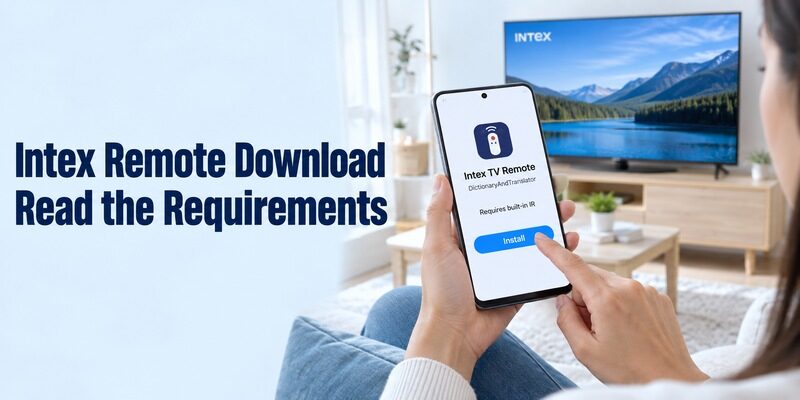
The app’s description matters more than the television name in its title. The current Intex TV Remote listing from DictionaryAndTranslator requires a phone with built-in infrared capability. It also states that the developer is not officially connected with the named third-party companies, and lists advertising and in-app purchases.
Treat that intex tv remote download as an independent infrared option. It is not proof of a manufacturer-issued app or a Wi-Fi connection method. Check the full listing on your own phone, including installation eligibility, before planning around a feature mentioned in a search result.
For a practical comparison of infrared and network-control claims, see this TV remote compatibility testing guide before assuming that an Intex-branded listing can control every television model.
Recognize Listings That Do Not Explain Compatibility
CodeRanch27 also publishes an Android app called intex tv remote. Its current description is brief and does not clearly establish a complete transport or model-compatibility specification. A recent update alone does not answer whether a particular television and phone can communicate through it.
This guide to matching a TV remote app to its model shows why the operating system and connection method matter more than a familiar brand name in the app title.
For an intex tv remote download with unclear requirements, ask the developer which connection type, phone hardware, and model family it supports. Do not infer those details from the appearance of its directional pad. Keep an already working remote available while you verify the alternative.
Search results can also include INTEX AIR MATTRESS REMOTE. Its own listing describes Bluetooth control of compatible air beds, not televisions. This is a practical example of why matching a brand word is insufficient: read what appliance the software controls before installing it.
If you are helping someone remotely, ask them to read the publisher and the requirement paragraph aloud before installing. That establishes whether you are discussing the same application. Screenshots of a search-results page can hide the very detail that decides whether the download will work on their phone.
Confirm Infrared Capability Before Trying Profiles
Check the Phone’s Actual Specifications
Software cannot create a missing infrared transmitter. Use the phone manufacturer’s specifications to confirm an IR blaster and its location. A camera, proximity sensor, flashlight, or Bluetooth radio is not the same component. Ordinary iPhones and Android phones without the required transmitter cannot send these appliance commands through installation alone.
An intex tv remote download that explicitly requires built-in IR should not be assumed to support any external dongle you find. Accessory support must be confirmed for the application and phone together. If the listing does not name that arrangement, treat it as unverified rather than a guaranteed workaround.
Distinguish Infrared from Network Control
Infrared uses a compatible transmitter and a matching television command profile. A network remote instead requires a supported television platform, local communication, and any necessary pairing. These two paths can produce similar buttons on the phone while relying on entirely different equipment.
Before testing several alternatives, compare free universal TV remote app options by their stated hardware and network requirements rather than by the remote layout shown in screenshots.
Before starting an intex tv remote download, decide which path your devices support. A television having Wi-Fi does not make every Intex-named IR app a network controller. Equally, an older infrared television does not become discoverable in Google TV merely because the phone can access the internet.
| Requirement | Infrared route | Network route |
|---|---|---|
| Phone capability | Compatible IR transmitter | Supported app and local connection |
| Television capability | Matching IR command set | Supported control platform |
| Initial test | Aim and send a simple command | Discover and complete pairing |
| Common mismatch | Phone has no IR hardware | App targets another operating system |
| Useful backup | Model-compatible handset | Controller for network recovery |
A successful intex tv remote download on one family member’s phone does not establish support on another handset. They may have different hardware even when both run Android. Check the second phone independently, and choose a supported network route if the television offers one and infrared is unavailable.
Test an Infrared Profile Against Real Buttons