Can You Turn On TCL TV Without Remote? Try These Methods
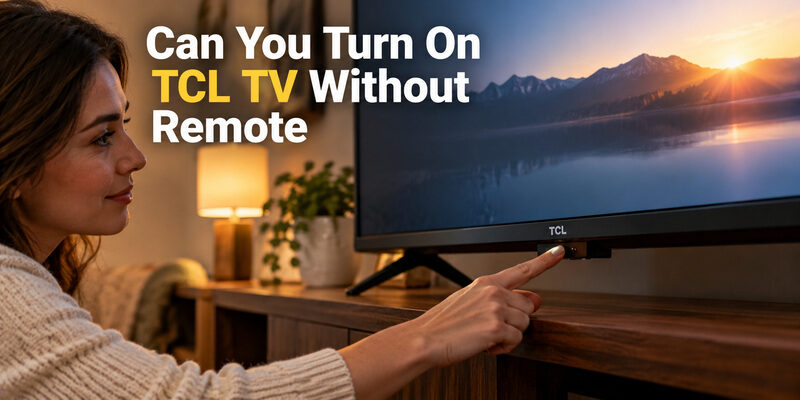
Yes, you can turn on a TCL TV without a remote. Press the physical power button, usually under the bottom bezel below the TCL logo or on the back or side edge of the frame. If you can’t reach it, smart TCL models also respond to a phone app, a voice command, or an HDMI-CEC device. Here’s how each method works.
Quick answer: Can you turn on TCL TV without remote?
- Power button: press once on the TV’s bottom, back, or side edge.
- Phone app: TCL Home, Roku app, or Google TV app on the same Wi-Fi.
- Voice: “OK Google, turn on the TV” or “Alexa, turn on the TV.”
- HDMI-CEC: turn on a console or streaming stick to wake the TV.
- Non-smart TCL: use a universal IR remote or a phone with an IR blaster.
Can You Turn On a TCL TV Without the Remote Using the Power Button?
Yes. Almost every TCL TV has a physical button, so it is the most reliable way to turn on a TCL TV without a remote.
Where to find it:
- Under the bottom bezel, often right below the TCL logo or status light.
- On the back or side edge of the frame.
- On some models it is a tiny multi-direction button rather than a clearly marked key.
How to use it:
- Check that the TV is plugged into a working outlet or power strip.
- Shine a flashlight along the bottom edge. A common mistake is pressing the status light or the IR receiver window, which is not a button.
- Press once and wait for the logo to appear.
- Once the TV is on, the same button can open a small on-screen menu on many TCL Roku and Google TV models. Use it to change inputs or power off.
If the TV is wall-mounted, check the manual for the exact model before pulling it away from the wall. The button is good for power and basic input changes, but typing a Wi-Fi password with it is slow. That is why most people then switch to their phone.
📲 No remote? Use your phone instead. Download the TV Remote app and pair your TCL TV in a few taps. Download the TV Remote App
📘 Find the Right Guide: TCL TV Remote Control Replacement Buying Guide
How to Turn On TCL TV Without Remote Using Your Phone?
If your TCL is a smart TV on your home network, your phone can replace the remote. The method depends on your TV’s platform:
- TCL Home app: links to your TCL smart TV.
- Roku app: for TCL Roku TV.
- Google TV app: for TCL Google TV or Android TV. It shows a pairing code on the TV screen.
Before you start:
- Connect your phone and the TV to the same Wi-Fi network and turn off any VPN.
- If the TV is completely off or disconnected from the network, turn it on once with the power button. An app cannot wake a TV that has no network connection.
- On TCL Roku TV, Fast TV Start (Settings → System → Power) keeps network connectivity available in standby. Turn it on while you still have control. It uses a little more standby power.
- If you lost the remote before the TV was ever set up on Wi-Fi, use the TV’s button once to open Network settings. You can also connect an Ethernet cable, or use WPS if your TV and router both support it.
How Do You Turn On TCL TV Without Remote Using Voice or HDMI-CEC?
Voice control
- Google: if your TCL has built-in hands-free voice control, say “OK Google, turn on the TV.”
- Alexa: if the TV is linked through an Amazon Fire TV device or the Alexa app, say “Alexa, turn on the TV.”
Voice commands only work if the TV was already linked to your assistant and is connected to the network.
HDMI-CEC
If a game console, Apple TV, or streaming stick is plugged into an HDMI port, turning that device on can wake your TCL TV and switch to its input. This works only when HDMI-CEC is enabled on both the TV and the device. If CEC is off in the TV settings, you may need the power button once to enable it.
Need a TCL remote with voice? See TCL TV Remote Original With Voice Control.
Universal Remote TV Control by Begamob
Can I Turn On TCL TV Without Remote If I Lost It or My TV Isn’t Responding?
Yes. Which fix applies depends on whether the TV is smart and whether it responds at all.
If the TV is not smart (no Wi-Fi or network menu):
- Phone apps cannot help because the TV has no network connection to talk to.
- Use a cheap universal IR remote that lists TCL, or an older Android phone with an IR blaster and a universal remote app.
If the remote or buttons seem dead:
- Unplug the TV for about a minute, then plug it back in.
- Replace the remote’s batteries (TCL TV Remote Battery Size and Replacement Guide). If that fails, remove the batteries, hold any button for 15 seconds, reinsert them, and re-pair the remote.
- Look for a keypad lock or hotel mode in settings. It can leave the TV button with fewer functions than usual.
- On Google TV or Android TV models, a USB keyboard in the TV’s USB port can also move through menus.
If you need a new remote: buy one that matches your exact model. A TCL Roku TV needs a TCL Roku TV remote, not a generic universal one. Still stuck? See TCL TV Not Responding to Remote Troubleshooting Guide.
FAQ
How to start TCL TV without remote?
Press the physical power button once. It is usually under the bottom bezel below the TCL logo or on the back or side edge. If you can’t find it, use your phone app or a voice command.
My TCL TV isn’t responding to the remote or buttons. What can I do?
Check that the TV has power, unplug it for about a minute, and replace the remote’s batteries. Re-pair the remote, check for a keypad lock or hotel mode, and try your phone app if the TV is on your network.
What to do if I lost the remote to my TCL TV?
Turn the TV on with its button, then control it with your phone or a USB keyboard. For a non-smart TV, use a universal IR remote. Buy a replacement that matches your model if you want a physical remote.
Can I turn on my TCL TV with my phone?
Yes, if it is a smart TCL on your home network. Use the TCL Home, Roku, or Google TV app on the same Wi-Fi. If the TV is fully off or offline, turn it on once with the power button first.
Final Thoughts
So, can you turn on TCL TV without remote? Yes: start with the power button, then set up your phone so you don’t depend on the remote again. If you ever ask “how to turn on TCL TV without remote” again, the answer is the same checklist: button, phone, voice, HDMI-CEC. And if you wonder “can I turn on TCL TV without remote” when you misplace it, keep a backup on your phone.
🔌 Never get stuck without a remote again. Begamob Universal TV Remote supports 1000+ TV brands. Keep it on your phone as a permanent backup. Explore Begamob Remote →