Vitron Smart TV Remote App Download: Complete Guide
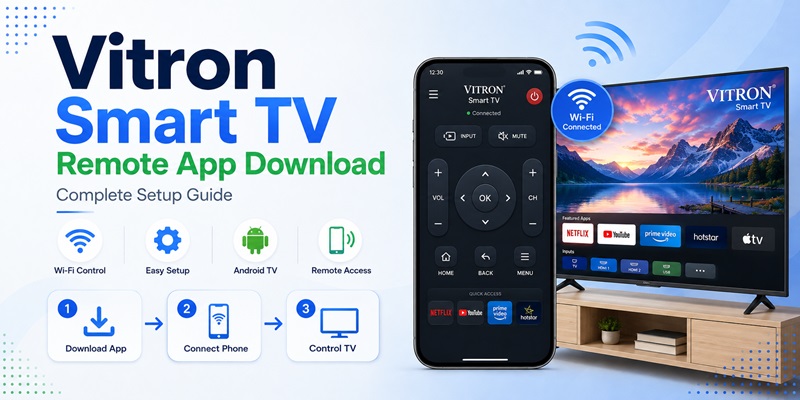
Quick Answer: Looking for a Vitron Smart TV remote app download? Android users can try Smart Remote for Vitron Tv on Google Play, a third-party app designed to control compatible Vitron TVs over Wi-Fi. If your Vitron television runs supported Android TV or Google TV software, Google’s mobile remote may be another option.
For iPhone users, a dedicated official Vitron remote app could not be verified. A compatible universal Wi-Fi remote may work, depending on the TV model.
Before downloading: Check your TV’s operating system and confirm that it supports phone-based remote control. Not every Vitron television can be controlled through Wi-Fi.
1. Vitron Smart TV Remote App Download: Best Options
The best Vitron TV remote app depends on your television’s operating system, network connection, and remote-control technology.
Best Vitron TV Remote Apps at a Glance
| Remote Option | Phone Platform | Best For | Important Limitation |
|---|---|---|---|
| Smart Remote for Vitron Tv | Android | Supported Vitron smart TVs | Third-party app; compatibility varies |
| Google TV mobile remote | Android and supported mobile platforms | Compatible Android TV or Google TV models | Requires supported Google TV remote services |
| Universal Wi-Fi TV remote | Android or iPhone | Compatible smart TVs | Must support the TV’s network protocol |
| IR remote app | Android phones with IR hardware | TVs using infrared commands | Requires a built-in IR blaster or compatible accessory |
| Physical replacement remote | No phone required | Older, offline, or unsupported Vitron TVs | Must match the TV model |
Option 1: Download Smart Remote for Vitron Tv on Android
A dedicated third-party app named Smart Remote for Vitron Tv is available on Google Play.
Developer: Sc App Studio Np
Platform: Android
App type: Third-party Wi-Fi remote
Price: Listed as an app containing advertisements; check Google Play for current availability and any additional charges.
The developer advertises features including:
- Directional navigation
- Volume control
- Channel switching
- Power controls
- Keyboard input
- Automatic device discovery
- Sleep timer
- Scheduled power actions
These are advertised features, not a guarantee that every Vitron model supports them.
Important: The Google Play listing explicitly states that this application is not affiliated with or endorsed by Vitron.
How to Download the App
- Open Google Play on your Android phone.
- Search for Smart Remote for Vitron Tv.
- Check that the developer is Sc App Studio Np.
- Read the app description, reviews, permissions, and privacy information.
- Tap Install.
- Open the app.
- Allow the permissions required for the features you want to use.
- Follow the app’s device-discovery instructions.
Before granting optional permissions, check whether they are necessary for basic remote control.
Option 2: Use Google TV Remote on Compatible Vitron Android TVs
If your Vitron television runs a supported Android TV or Google TV system, you may be able to use Google’s mobile remote.
Google officially supports phone-based control of compatible Android TV devices.
The remote can provide:
- Directional navigation
- Playback control
- Volume adjustments where supported
- Text input
- Voice features where supported
This option may be preferable to an unrelated third-party remote app when the TV supports Google’s standard remote service.
However, not every Vitron television described as an “Android Smart TV” uses certified Android TV software.
A generic Android-based TV may not appear in the Google TV app.
Option 3: Use a Compatible Universal TV Remote App
Some universal remote apps can control supported smart TVs through a local Wi-Fi network.
Before installing one, confirm:
- Support for your TV’s operating system
- Compatibility with the Vitron model
- Available navigation functions
- Pairing requirements
- Free versus paid features
You can compare general options in our free remote control app for TV guide.
Do not assume that an app supporting hundreds of TV brands necessarily supports your specific Vitron model.
Which Vitron TV Models Support Phone Remote Apps?
Compatibility is determined by more than the screen size.
For example, two 43-inch Vitron TVs may have different operating systems and remote-control capabilities.
Use this checklist:
| TV Characteristic | What It Means |
|---|---|
| Certified Android TV or Google TV | Google’s mobile remote may work |
| Smart TV with network remote feature | A compatible Wi-Fi app may work |
| Generic Android-based TV | Requires app-specific compatibility |
| Wisdom Share Smart Cloud interface | Verify the TV’s supported remote method |
| Basic non-smart Vitron TV | Usually needs infrared or a physical remote |
| TV not connected to a network | Wi-Fi remote discovery may fail |
Find the full model number on the TV’s rear label or in its Settings menu.
Then check the software platform before downloading.
2. Can Every Vitron TV Work with a Phone Remote?
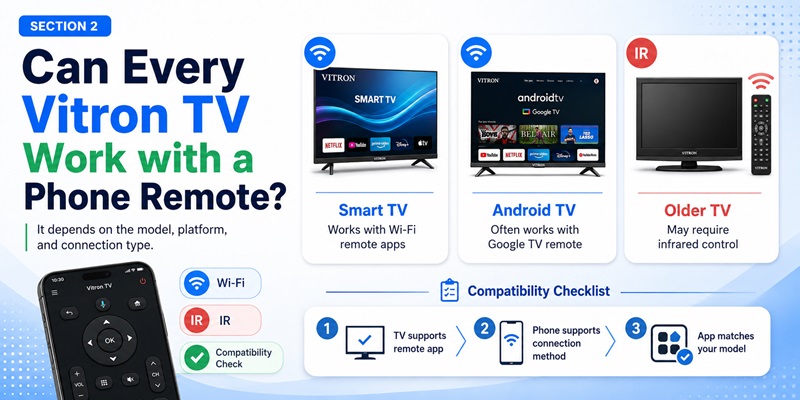
No. A vitron smart tv remote app download cannot be guaranteed to control every Vitron television. Compatibility depends on the complete model number, operating system, network settings, phone hardware, and supported control protocol.
Retailers list several 43-inch Vitron televisions as Smart Android TVs with built-in Wi-Fi, but specifications vary by model. The words “smart” or “Android” do not prove that every set uses the same mobile remote system.
A Phone Remote Is More Likely to Work When
- The television runs certified Android TV or Google TV.
- The TV has a mobile remote or network-control setting.
- The phone and TV are connected to the same local network.
- The app supports the TV’s exact protocol.
- A pairing code appears on the television.
A Phone Remote May Fail When
- The TV is a basic non-smart model.
- The television requires infrared.
- The phone has no IR blaster.
- The set uses an unsupported proprietary platform.
- Network control is disabled.
- The router isolates connected devices.
- The app supports another Vitron model family.
Before searching for vitron smart tv 43 remote control app free download, read the model label on the back of the television. Screen size is not enough because two 43-inch Vitron TVs may use different software.
A careful vitron smart tv remote app download process begins with the model number, not the first app result.
3. How to Identify Your Vitron TV Platform and Model
The correct vitron smart tv remote app download depends on what software and communication hardware the television uses.
Find the Full Model Number
Check the rear label, box, receipt, product page, or Settings menu. Write down every letter and number. This helps you compare the TV with app descriptions and retailer specifications.
Open Settings and look for Android TV or Google TV branding, Google Play Store, Google account sign-in, Chromecast built-in, Device Preferences, Bluetooth accessories, network control, mobile pairing, and system information.
If the TV includes standard Android TV settings and Google services, Google’s mobile remote may replace a dedicated vitron smart tv remote app download.
Certified Android TV vs Generic Android
Some televisions use Android-based software without certified Android TV services. They may run apps but lack Google’s standard TV remote service. As a result, the Google TV app may not discover them even though “Android” appears in the product description.
A third-party vitron smart tv remote app download may work if it supports that platform’s network commands. If it does not, the TV may need infrared control.
Check Whether the Original Remote Uses IR
If the original remote works only when pointed directly at the TV and does not require pairing, it probably uses infrared for core commands. Some smart remotes combine IR with Bluetooth or Wi-Fi.
When users search download vitron tv remote control, they should first confirm whether the phone has an IR blaster. Software alone cannot replace missing hardware.
Download Vitron TV Remote4. How to Download a Vitron TV Remote App Safely
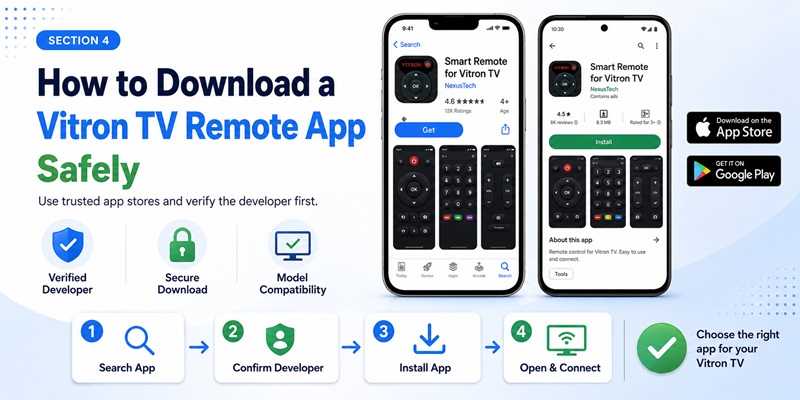
The safest vitron smart tv remote app download normally begins in Google Play or the Apple App Store. Before installing, confirm that the vitron smart tv remote app download supports your exact model. Avoid unknown download buttons, modified versions, and pages that ask you to disable phone security.
Android Download Steps
- Open Google Play.
- Search for Smart Remote for Vitron TV, Android TV remote, or a compatible universal remote.
- Open the complete app listing.
- Verify the developer, update date, reviews, permissions, pricing, and data-safety information.
- Read the disclaimer to learn whether the app is official or independent.
- Tap Install.
- Open the app and grant only the permissions required for selected features.
The current Smart Remote for Vitron TV listing is published by Sc App Studio Np, contains ads, and says it is not affiliated with Vitron. It reports more than 10,000 downloads and was updated on July 2, 2026.
This information does not prove that the vitron smart tv remote app download will support your model. It simply helps you understand who created the app and what the developer claims.
iPhone Download Options
I could not verify a dedicated official Vitron iPhone remote in the available App Store results. iPhone users can test a reputable Android TV or universal Wi-Fi remote, but should confirm support before subscribing. A vitron tv remote app download may be free to install while placing full controls behind a trial.
Review Permissions
Local-network or nearby-device access may be necessary for discovery. Microphone permission may support optional voice control. The Google Play listing for Smart Remote for Vitron TV also mentions Wi-Fi, vibration, alarms, notifications, and audio-recording permissions for certain features.
Contacts, SMS messages, call logs, and unrelated personal files are not normally required for a basic vitron smart tv remote app download.
5. How to Connect and Set Up the Remote App
After completing the vitron smart tv remote app download, prepare both devices before pairing.
Step 1: Connect the TV and Phone
Turn on the TV with its physical button or existing remote. Connect the television to your normal home Wi-Fi. Connect the phone to the same network name.
Avoid guest networks because many routers prevent guest devices from communicating with local TVs.
Step 2: Open the App and Scan
Launch the vitron smart tv remote app download and select Add Device, Find TV, Scan, Connect, or a similar option. Allow local-network access when requested.
Wait for the TV name or IP address to appear. If several devices are listed, compare them with the Network or About information on the television.
Step 3: Complete Pairing
Tap the correct TV. The television may show a PIN or pairing request. Enter the code on the phone or approve the connection on screen.
Pairing may fail when the code expires, the wrong device is selected, or the TV stores too many old connections.
Step 4: Test More Than One Button
A successful vitron smart tv remote app download should be tested with:
- Directional pad and OK
- Back and Home
- Volume and mute
- Channel controls
- Input or source
- Playback buttons
- Keyboard input
- Power or standby
Partial compatibility is common. An app may navigate menus but fail to control power or volume because those functions use infrared or a separate protocol.
Step 5: Keep the Physical Remote
Keep the original remote for Wi-Fi recovery, pairing approval, resets, and router changes. Treat the vitron smart tv remote app download as a second remote until every important function has been tested.
6. How to Use Google TV with Compatible Vitron Android TVs
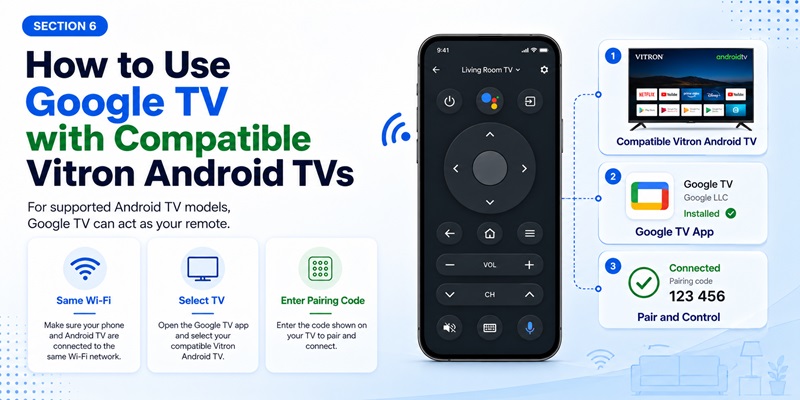
A Vitron television that runs compatible Android TV software may work with Google’s own mobile remote. In this case, a separate vitron smart tv remote app download may not be necessary.
Google’s official process is:
- Open the Google TV app.
- Tap Connect TV.
- Select the television.
- Enter the code shown on the TV.
- Tap Pair.
When Google TV Is a Good Choice
Try Google TV when the television has certified Android TV or Google TV, Google Play services, a standard pairing screen, and both devices are on the same Wi-Fi network.
The remote can provide standard navigation and text input. Because it is designed for Android TV, it may be more dependable than an unrelated vitron smart tv remote app download.
Why Google TV May Not Find the Television
Discovery may fail when:
- The TV uses generic Android instead of certified Android TV.
- The television uses another smart platform.
- Remote services are outdated or disabled.
- The phone and TV are on different networks.
- Router isolation blocks local discovery.
- The TV is in deep standby.
Do not assume every Android-branded Vitron set will pair. Confirm the operating system before replacing one vitron smart tv remote app download with another.
7. What Does Wisdom Share Smart Cloud TV Remote Download Mean?
The phrase wisdom share smart cloud tv remote download is unclear. Search results commonly connect Wisdom Share Smart Cloud with physical replacement remotes, compatible TV families, startup screens, and user discussions. I could not verify one official mobile app with that exact name.
This suggests Wisdom Share Smart Cloud may describe a TV software platform or remote family rather than a verified smartphone app.
Check the TV Menu Before Downloading
If the television shows Wisdom Share during startup, open its Settings menu and look for:
- Mobile remote
- Phone control
- QR code
- Companion app
- Network remote
- Device connection
Use the exact application name shown on the television. Do not assume that a search result titled wisdom share smart cloud tv remote download is official.
Possible Alternatives
When no verified network remote is available, use a compatible replacement remote, an IR-capable Android phone, a reputable universal IR app, a USB keyboard, physical TV buttons, or retailer support.
Do not confuse wisdom share smart cloud tv remote download apk with TV firmware. A phone APK and a television firmware package are different files.
A vitron smart tv remote app download should never be installed as a firmware update on the TV.
Download Vitron TV Remote8. Is a Vitron or Wisdom Share Remote APK Safe?
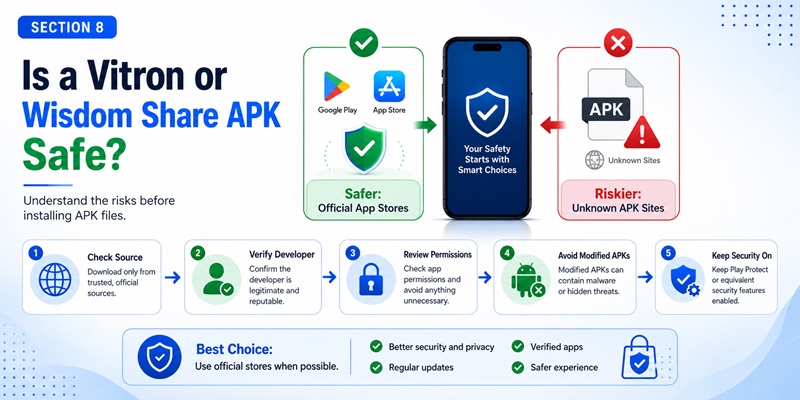
An APK is an Android installation file. A vitron smart tv remote app download from an APK mirror can sometimes be installed outside Google Play, but the source may be modified, outdated, or impersonating another developer.
The search phrase wisdom share smart cloud tv remote download apk may lead to file-hosting sites that provide little proof of origin. When the same application is available on Google Play, the store version is normally the safer starting point.
Common APK Risks
An unverified APK may include modified code, unrelated permissions, deceptive payment screens, unwanted advertising, weak updates, or an imitated app identity. A third-party site currently mirrors the Smart Remote for Vitron TV APK, but the mirror is not preferable to the active Google Play listing.
Safer APK Checklist
Only consider sideloading when you can verify:
- The developer’s official website
- The package name
- The signing certificate
- The current version
- The reason the app is not in the store
- The privacy policy
- The update method
Never disable Android security permanently for a vitron smart tv remote app download. Avoid cracked, modified, or “premium unlocked” files.
9. How to Fix a Vitron Remote App That Does Not Work
A vitron smart tv remote app download may install correctly but fail to discover, pair with, or fully control the TV.
The TV Does Not Appear
Check that:
- Both devices use the same Wi-Fi network.
- Neither device is connected to guest Wi-Fi.
- Local-network permission is enabled.
- A VPN is temporarily disabled.
- The television is awake.
- Mobile-control settings are enabled.
- The router allows devices to communicate.
- The TV, phone, and router have been restarted.
A wired TV and wireless phone can communicate on the same local network, although some routers isolate them.
Pairing Fails
Delete old phone connections from the TV when possible. Restart the vitron smart tv remote app download, generate a new PIN, and enter it before it expires.
Confirm that the app selected the correct TV. Similar device names can cause pairing with the wrong screen.
Only Some Buttons Work
Try another profile, test Google TV on certified Android TV models, or use infrared for functions such as power and volume when your phone supports IR.
Update the app and TV firmware. Contact the app developer with the full model number. The Smart Remote for Vitron TV listing itself says users must ensure that the television supports network remote control.
The TV Is Offline
A Wi-Fi vitron smart tv remote app download cannot find a TV that is not connected to the network. Use a physical button, replacement remote, IR phone, USB keyboard, Ethernet connection, or previously paired Bluetooth remote to restore access.
After the television reconnects, repeat the discovery process.
Explore Articles: Download Remote TV Toshiba: How to Control Toshiba TV With Your Phone
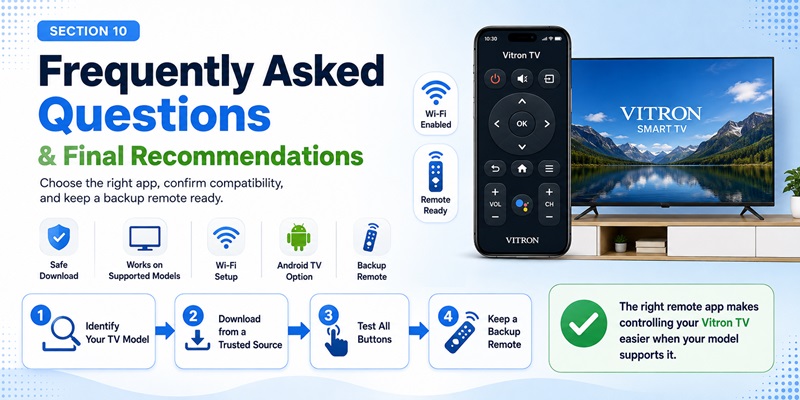
10. Frequently Asked Questions and Final Recommendations
Is There an Official Vitron Remote App?
I could not verify a Vitron-published mobile remote in the available store results. The Android app named Smart Remote for Vitron TV says it is not affiliated with or endorsed by Vitron.
Is the Vitron Remote App Free?
The current Android listing is free to install and contains ads. Free installation does not guarantee that every present or future feature is free.
Where Can I Find a Vitron Smart TV 43 Remote Control App Free Download?
Search Google Play with the full model number. A vitron smart tv 43 remote control app free download should be chosen by platform and connection method, not by screen size alone.
Can I Download Vitron TV Remote Control on iPhone?
You can test a compatible Android TV or universal Wi-Fi remote, but I could not verify an official Vitron-specific iPhone application. Confirm compatibility before starting a subscription.
Does the Phone Need Infrared?
Not for a Wi-Fi vitron smart tv remote app download. Infrared is required only when the app sends traditional IR commands.
Can the App Turn On the TV?
It depends on whether the television supports network wake-up, remains connected during standby, or receives an IR power command.
Is Wisdom Share Smart Cloud an App?
I could not verify a single official application with that exact name. Available results more commonly describe physical remotes and compatible TV software.
What Should I Use When No App Works?
A compatible physical replacement remote is the most dependable backup for Wi-Fi setup, factory reset, deep standby, and infrared-only televisions.
Final Recommendation
The best vitron smart tv remote app download is the one that matches the television’s exact operating system and control method. Start by identifying the full model number. Determine whether the set runs certified Android Remote TV App, generic Android, Wisdom Share Smart Cloud, or another platform.
For compatible Android TV models, try Google TV’s official remote process first. For other network-enabled sets, the third-party Smart Remote for Vitron TV may be tested, but remember that its listing says it is not endorsed by Vitron.
Complete every vitron smart tv remote app download through Google Play or the App Store whenever possible. Review the developer, disclaimer, permissions, pricing, and update history. Avoid unknown APK mirrors, especially when a store version exists.
After pairing, test navigation, volume, power, source, keyboard, and standby. Keep a physical backup available. A carefully selected vitron smart tv remote app download can replace a lost remote for many daily tasks.
With the correct model information and a safe installation source, the vitron smart tv remote app download becomes a useful second controller for everyday viewing.
Download Vitron TV Remote